

Materials Facility Lab
Website, Equipment Booking & Request Management
The Materials Facility Lab solution puts a shared research facility online. Visitors browse the equipment, the services and rates, and the staff who run each instrument, then book through a guided form that captures their details, purpose, compliance and training confirmations, samples, and a date and time slot from the live calendar, with a quotation generated on the spot. Facility administrators manage equipment, services, rates, documents and staff, approve, reject or reschedule requests with templated emails, keep internal memos, mark work complete and export a full audit log of every booking, email and attachment.
Solution Overview
One portal for visitors, users and the facility team
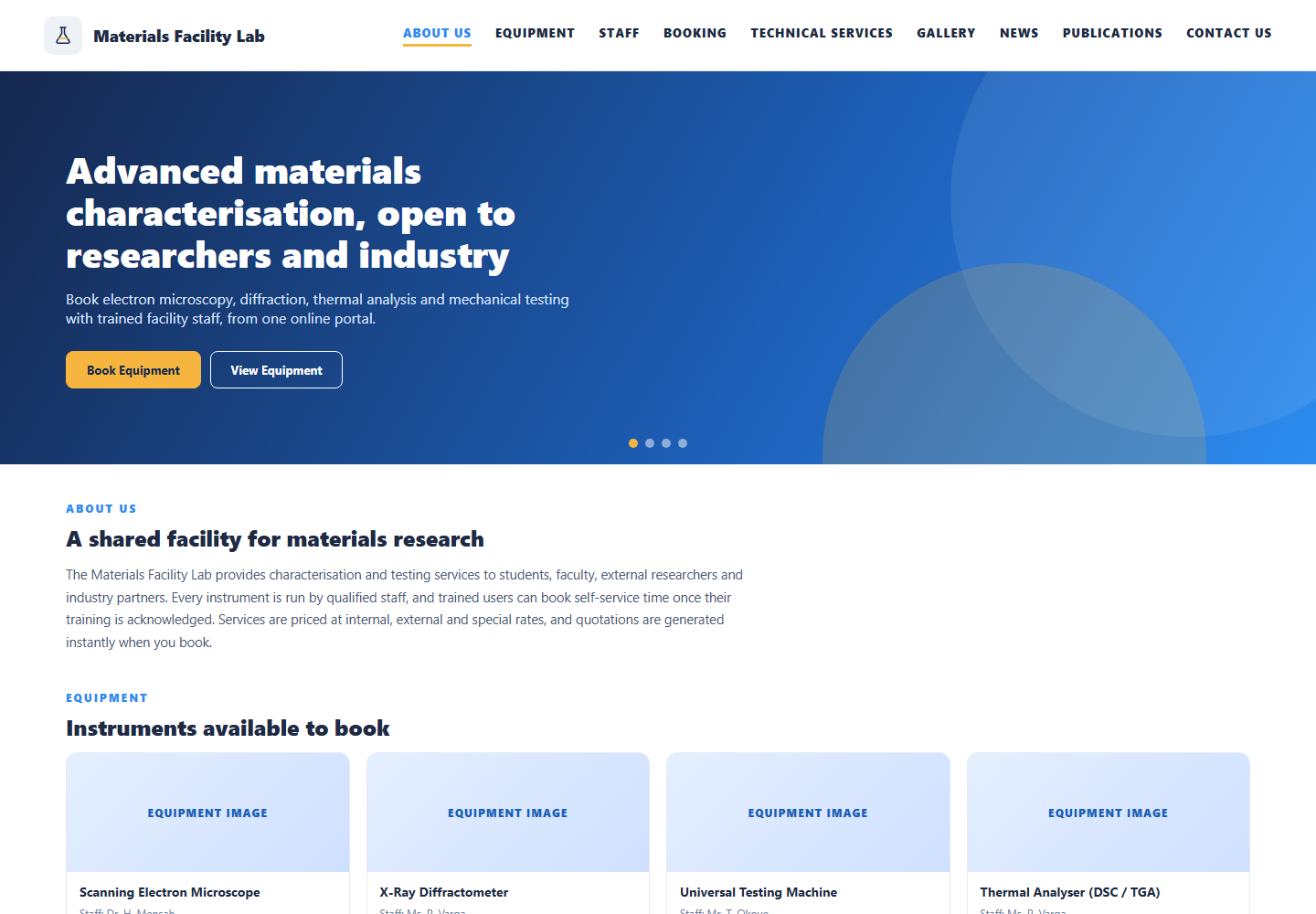
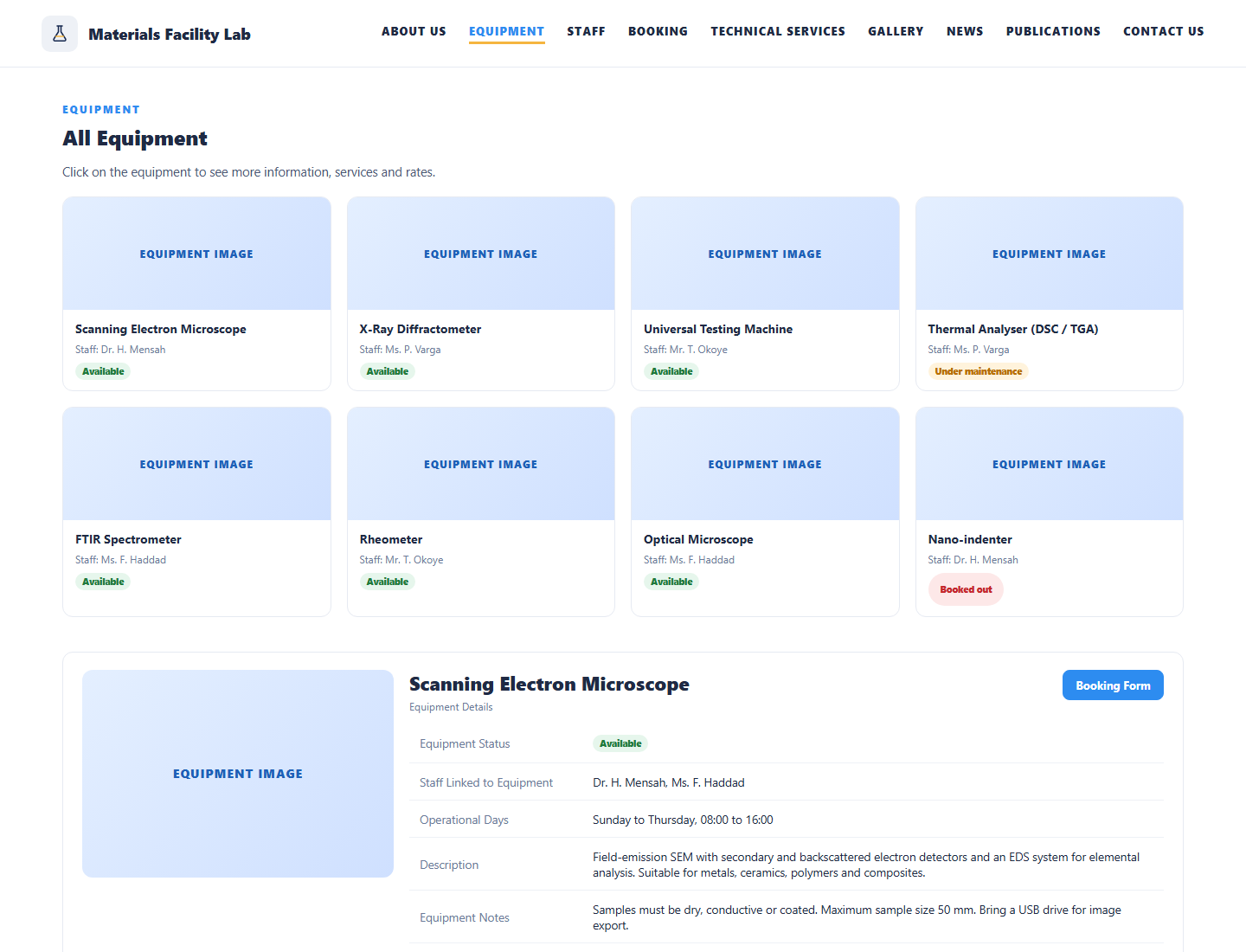
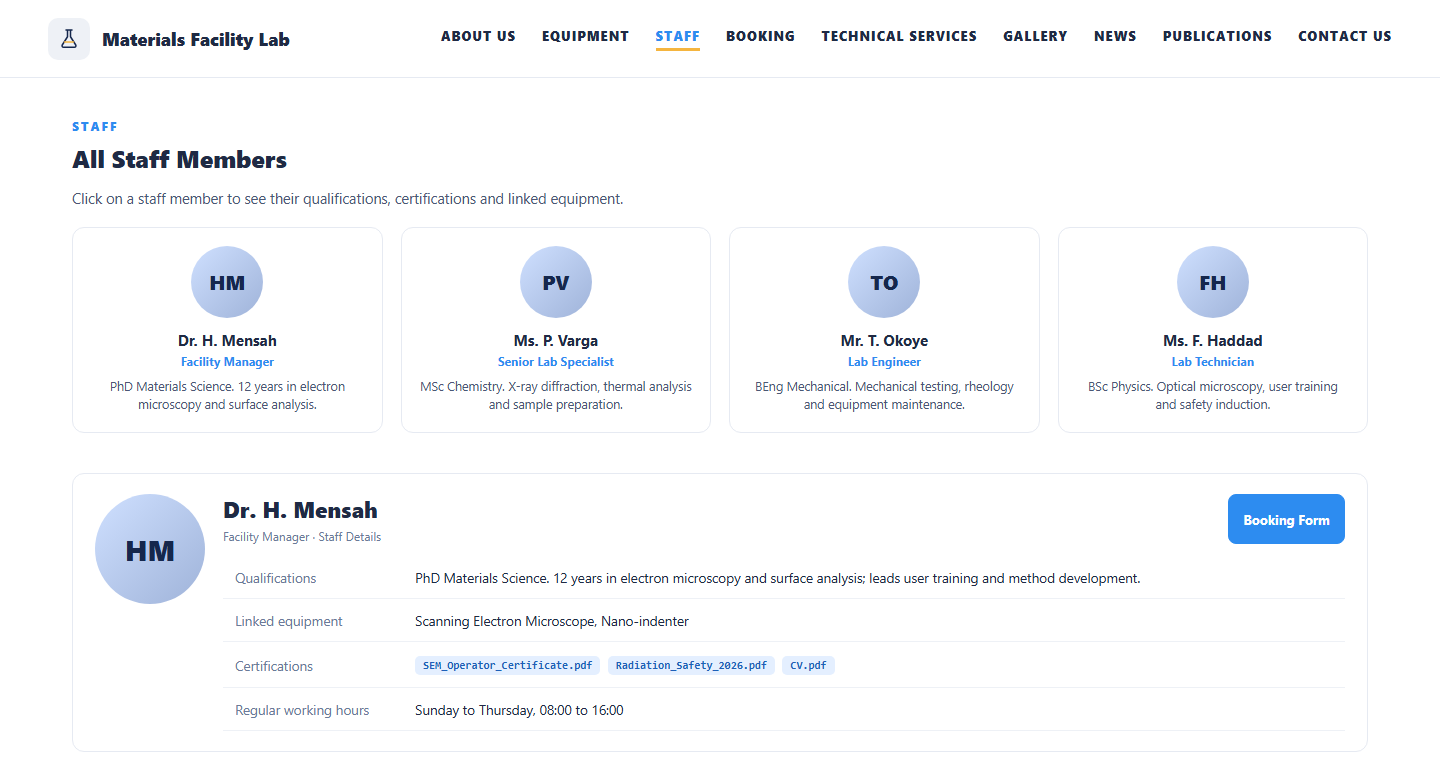
The public site presents the facility: About Us, Equipment, Staff, Booking, Technical Services, Gallery, News, Publications and Contact Us, all maintained by the facility from an admin view with image upload, ranking and rich-text descriptions. Each equipment page shows the status, the staff linked to it, operational days, notes, and the services with unit rates for internal, external and special or other users. Each staff page shows qualifications, linked equipment and certifications. From either page a visitor opens the booking form.
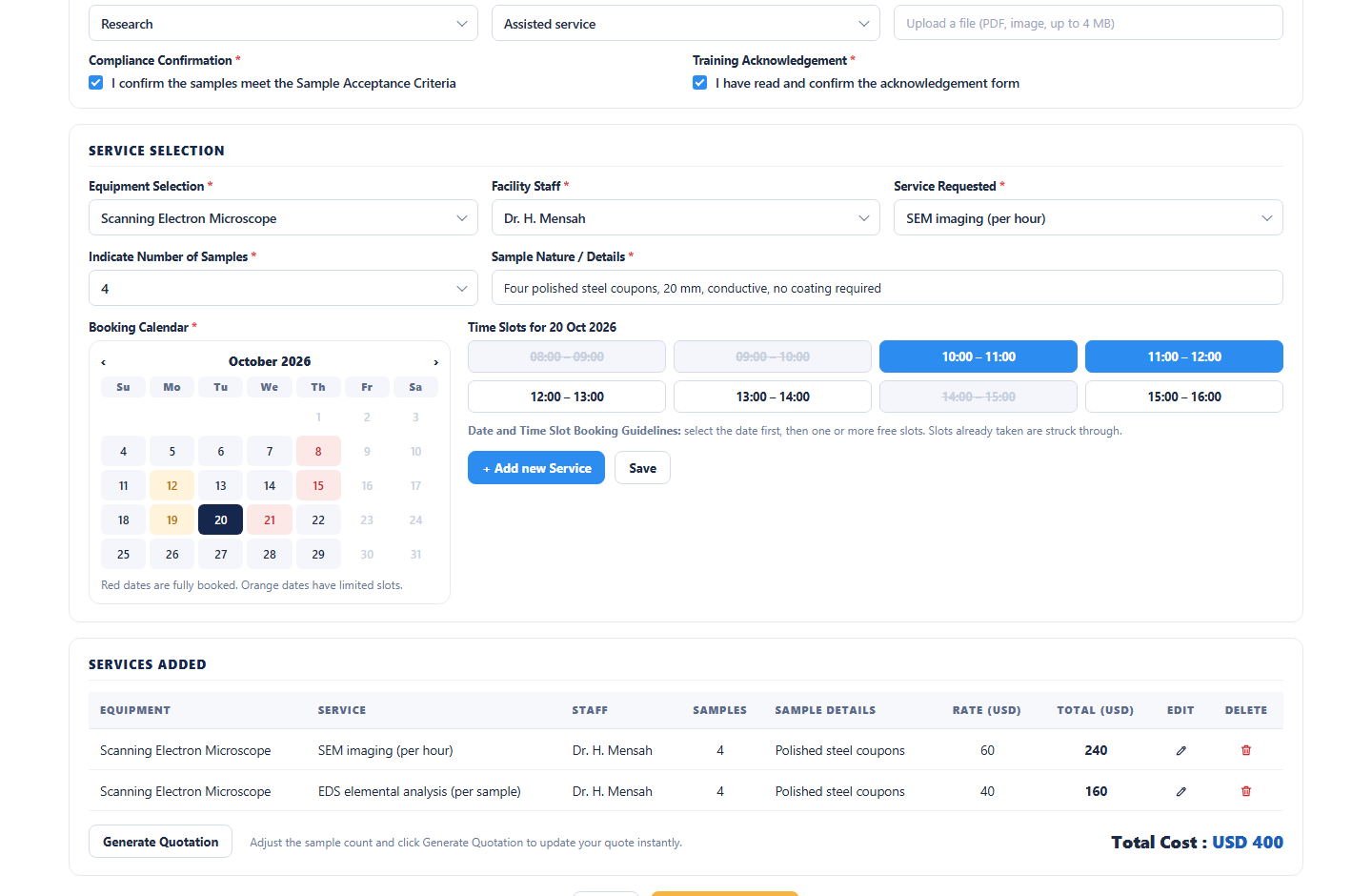
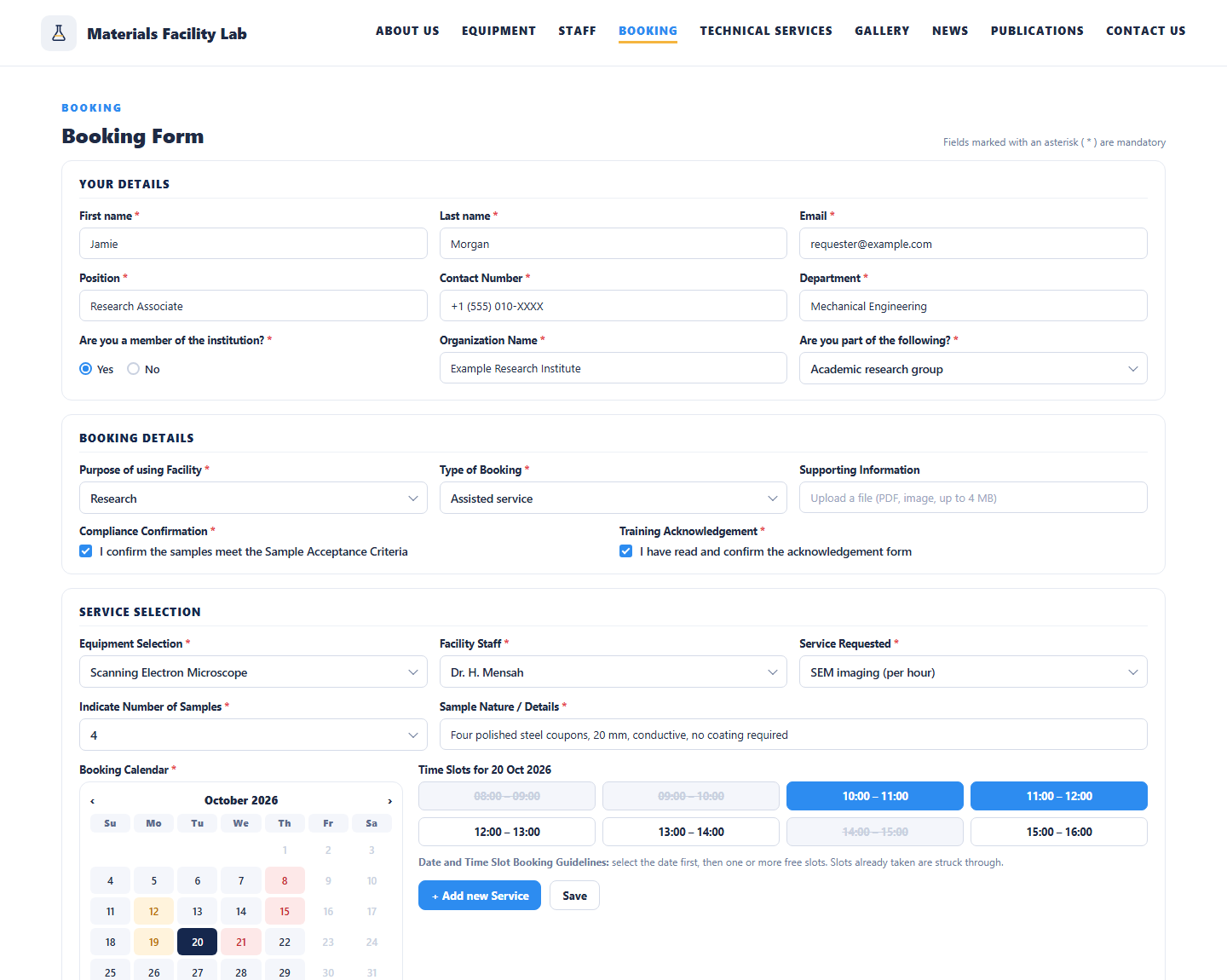
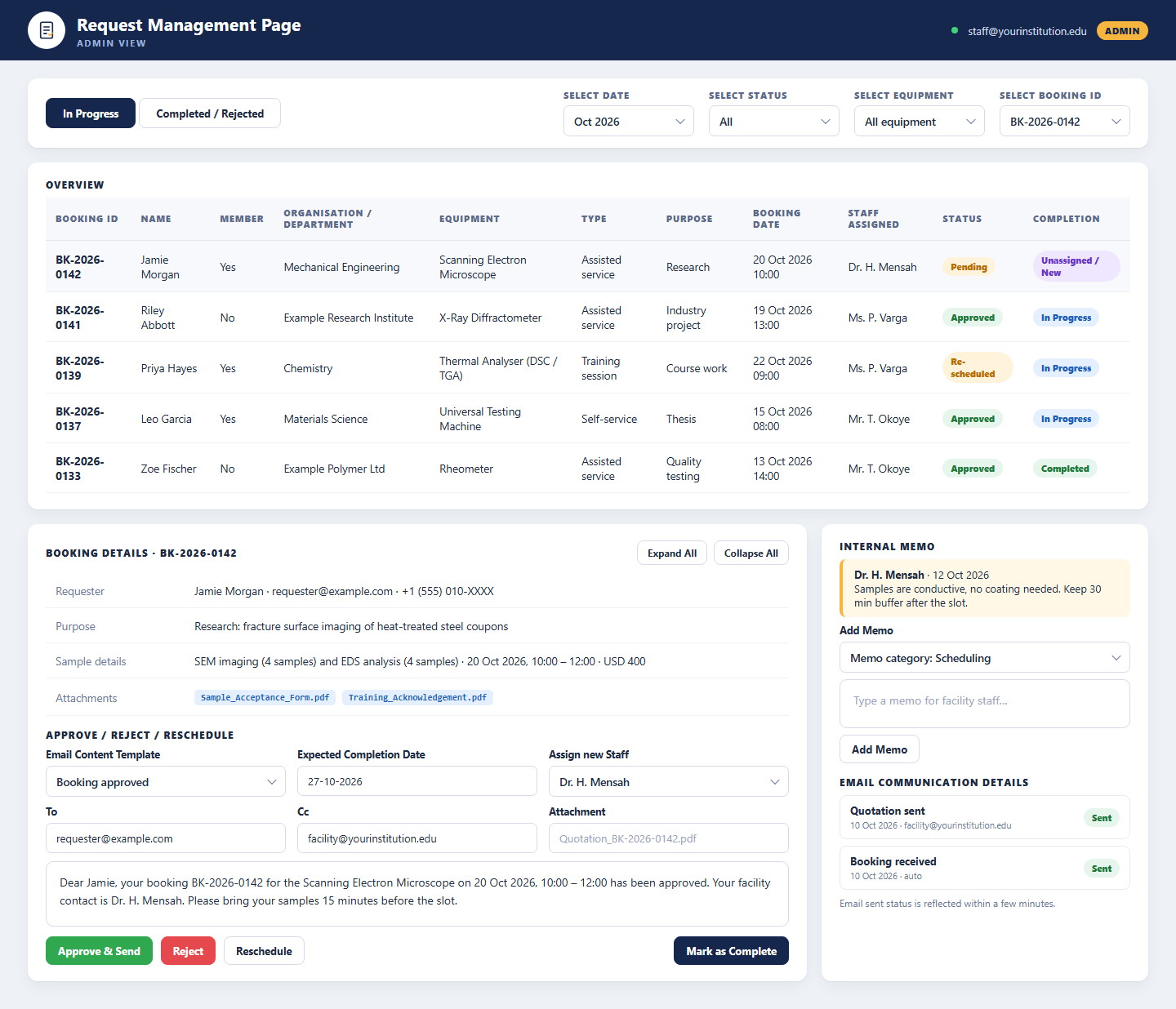
The booking form collects the requester’s details, membership of the institution, organisation and department, the purpose and type of booking, compliance confirmation against the sample acceptance criteria and the training acknowledgement. The requester selects equipment, facility staff, service and number of samples, picks a date on the calendar, where fully booked days are shown in red, chooses free time slots, adds more services if needed and generates a quotation with the total cost before submitting. Administrators then handle the request: review booking, sample and attachment details, approve, reject or reschedule with an email built from a template, assign staff, set the expected completion date, add internal memos, mark the booking complete and see the email communication log. Equipment and staff management, email content templates with dynamic fields and a searchable, exportable audit log complete the workspace. Everything runs on the BDB Platform.
- Public website with equipment, staff, services and rates maintained by the facility
- Guided booking form with compliance and training confirmations and a slot-based calendar
- Instant quotation at internal, external or special rates before the booking is submitted
- Admin request management with templated emails, staff assignment, memos and audit logs

What It Does
Facility Website
A public site with About Us, Equipment, Staff, Booking, Technical Services, Gallery, News, Publications and Contact Us, edited by the facility without code.
Online Booking & Quotation
A guided form with requester details, compliance and training confirmations, equipment, service and samples, a slot-based calendar and an instant quotation.
Admin Workspace
Equipment, services, rates and documents; staff profiles, hours and certificates; request approval with templated emails; memos, completion and audit logs.
Who It Serves
Find the right instrument and book it
- Browse equipment, status, operational days and notes
- See services and rates for internal, external and special users
- Read staff qualifications and certifications
- Complete the booking form with compliance and training confirmations
- Pick a date and free time slots from the live calendar
- Generate a quotation and submit, with confirmation by email
Run the instruments and the requests
- See bookings assigned to them with sample details and attachments
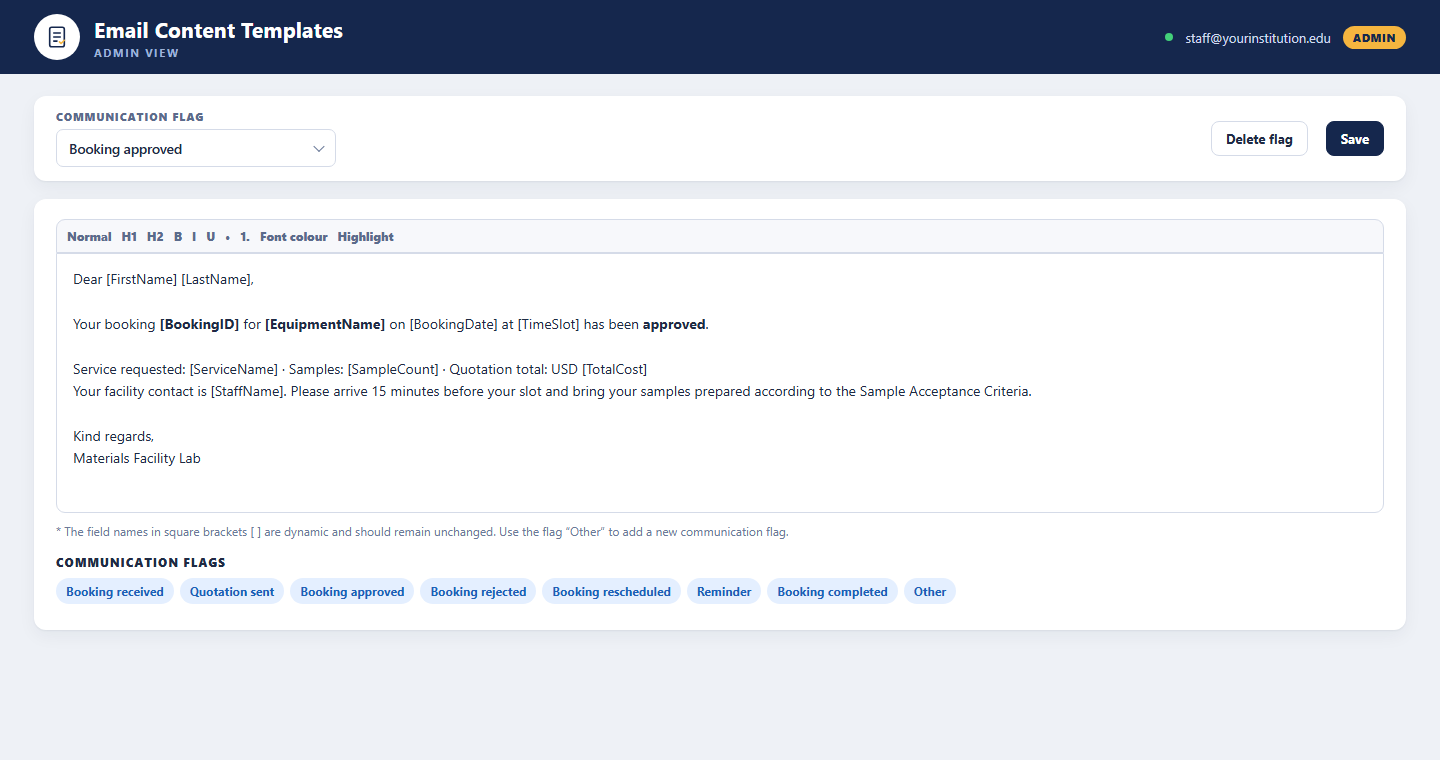
- Approve, reject or reschedule with a templated email
- Set the expected completion date and assign another staff member
- Keep internal memos on each booking
- Mark bookings complete when the work is delivered
- Keep their profile, working hours and out-of-office dates current
Manage the facility end to end
- Add equipment with services, rates, images and documents
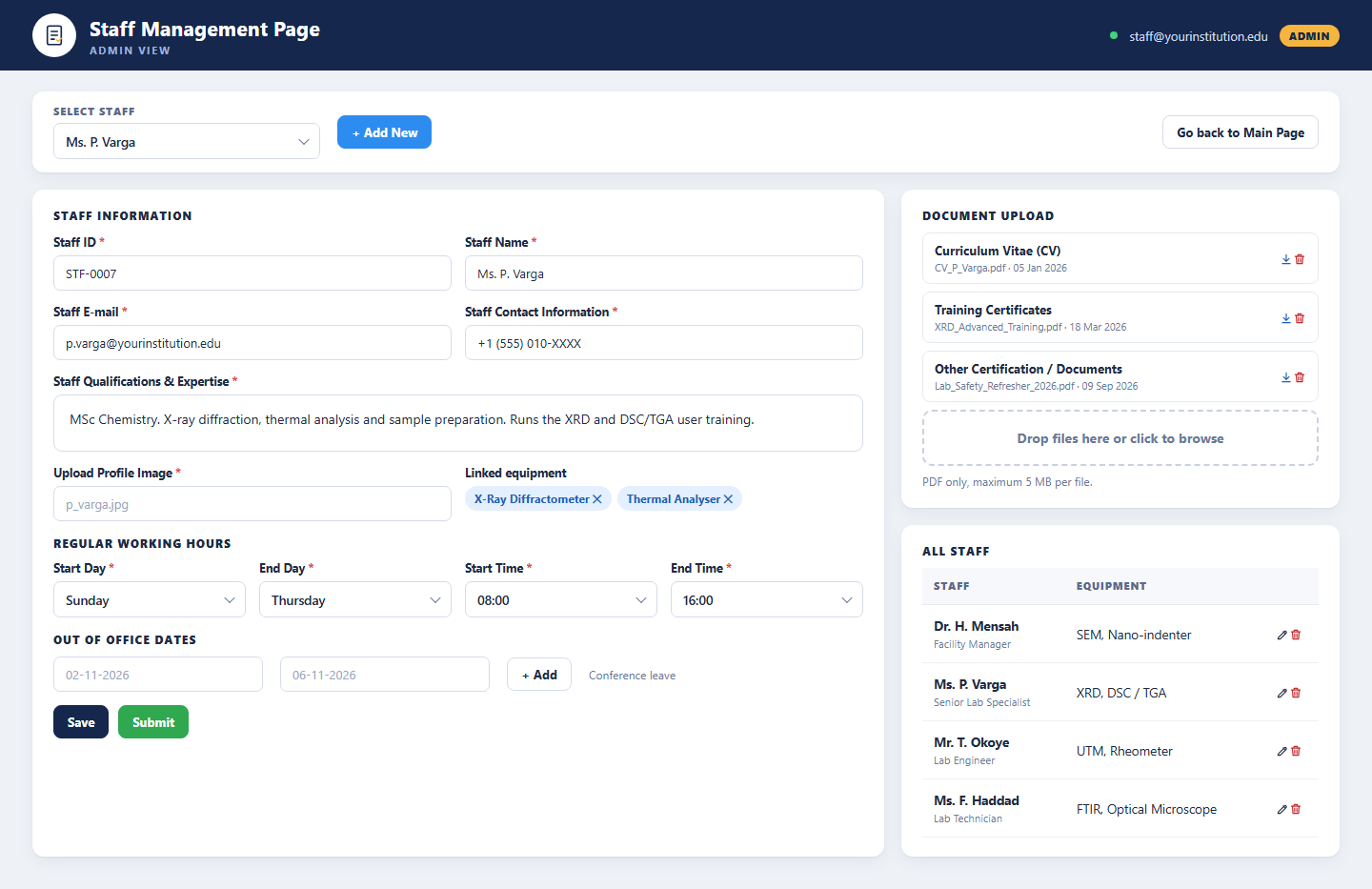
- Maintain staff profiles, certificates and linked equipment
- Set unavailability dates for equipment and staff
- Edit the website content, gallery, news and publications
- Maintain email content templates and communication flags
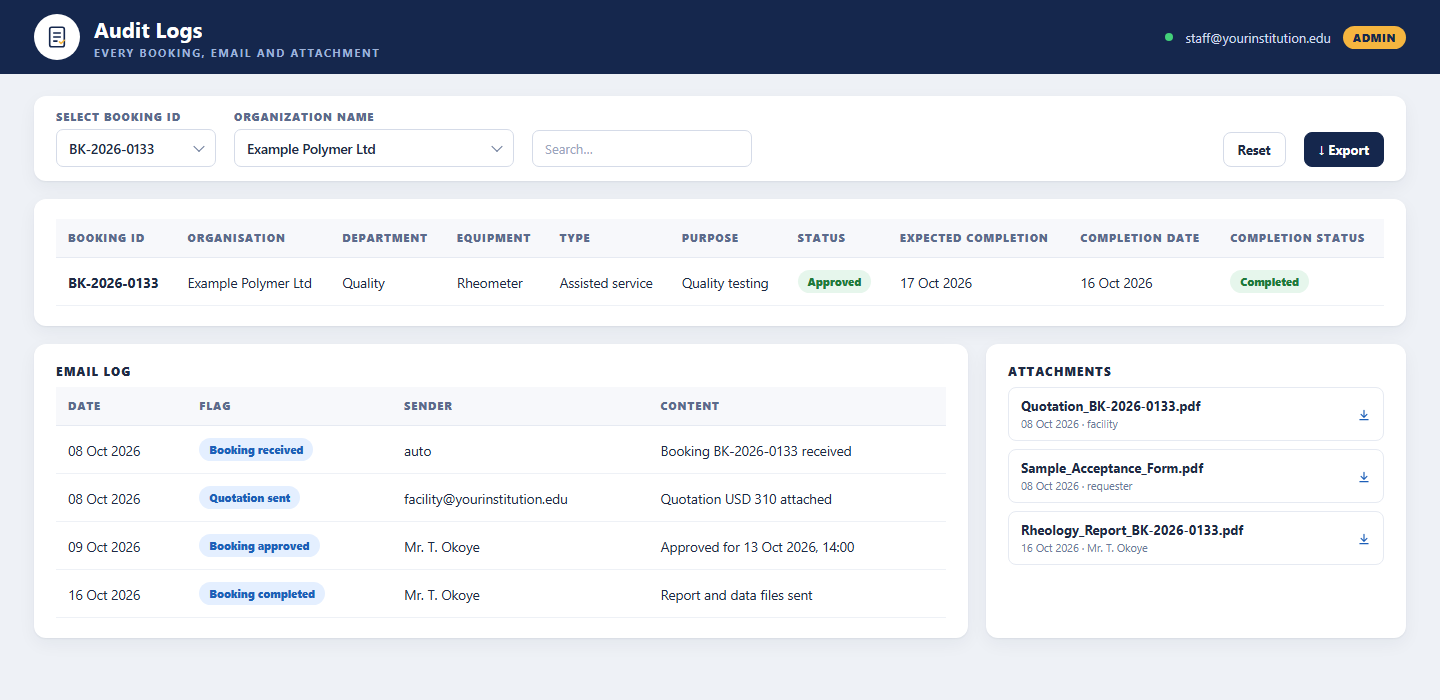
- Search and export the audit log of bookings, emails and attachments
How It Works
From browsing to a completed booking in four steps
A visitor finds the equipment and service on the public site and opens the booking form. They enter their details, confirm compliance and training, choose equipment, staff, service and samples, pick a date and time slots and generate a quotation. The facility reviews the request, approves it with a templated email and assigns staff. When the work is done the booking is marked complete and the whole history stays in the audit log.
Browse
Explore equipment, services, rates and staff on the facility website and open the booking form.
Book
Enter details, confirm compliance and training, choose equipment, service and samples, pick a slot and generate a quotation.
Approve
The facility reviews the request, approves, rejects or reschedules with a templated email and assigns staff.
Deliver
Staff complete the work, mark the booking complete and the audit log keeps every email and attachment.
Benefits and Features
Facility Website
Nine sections including gallery, news, publications and technical services, with image upload, ranking and rich-text editing from the admin view.
Equipment Pages
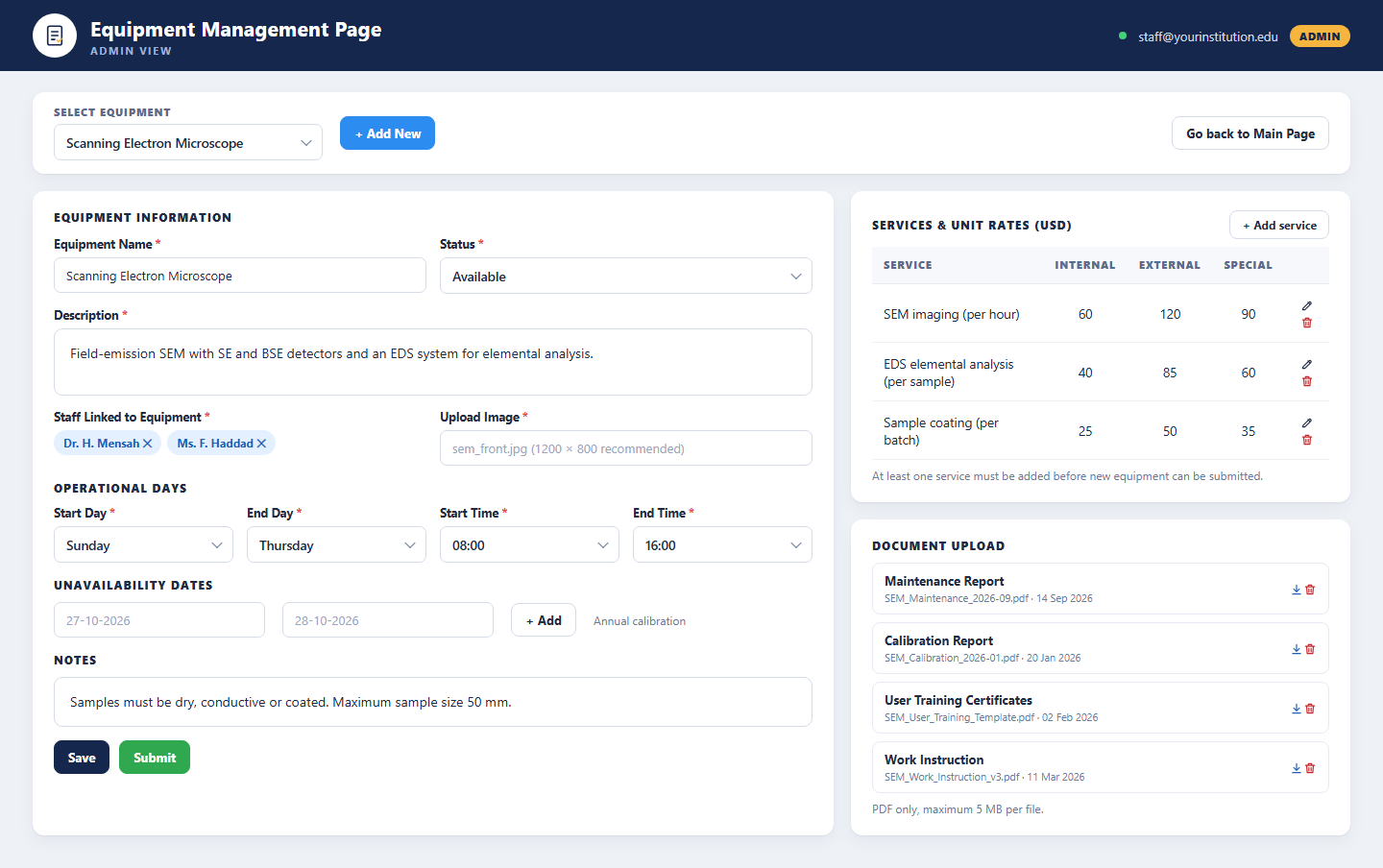
Name, image, description, status, linked staff, operational days, notes and a services table with internal, external and special rates.
Staff Pages
Profile image, qualifications and expertise, linked equipment, certifications and documents available to download.
Guided Booking Form
Requester details, membership, organisation, purpose, type of booking, compliance confirmation and training acknowledgement, all mandatory fields marked.
Slot-Based Calendar
A booking calendar with fully booked dates in red, free time slots per date, and equipment and staff unavailability respected automatically.
Instant Quotation
Add services and sample counts, generate the quotation and see the total cost before submitting; duplicate or edited services update the quote.
Templated Emails
Communication flags such as booking received, quotation sent, approved, rejected, rescheduled and completed, with dynamic fields in square brackets.
Request Management
In-progress and completed views, filters by date, status, equipment and booking ID, approve, reject, reschedule, assign staff, expected completion, memos and mark complete.
Audit Log & Documents
Every booking with its emails and attachments, searchable by booking ID and organisation and exportable, plus maintenance, calibration, training and work-instruction documents per equipment.
Platform Screens
Three Roles, One Platform
Visitors & Requesters
Browse the facility website, equipment, services, rates and staff, and book an instrument with an instant quotation, no sign-in needed.
Facility Staff
Sign in to handle assigned bookings, approve or reschedule with templated emails, keep memos and mark work complete.
Administrators
Manage equipment, services, rates, documents, staff, website content, email templates and the audit log.
Tailored to Your Institution
Flexible by design
The solution provides flexibility to tailor components to the institution’s own identity and requirements. Logo, branding, colour theme, communication style, terminology, workflows and other institution-specific requirements can be customised if required.
Every element seen in the demo is a starting point. Yujaa configures the solution around how your facility team already works, so everyone experiences a platform that feels like their own.
Logo & Branding
Institution logo, name and visual identity across every portal and email.
Colour Theme
Palette and styling aligned to the institution’s brand guidelines.
Communication & Terminology
Email tone, labels and terms matched to how the institution speaks.
Workflows
Approval steps, forms and role permissions set to local requirements.
Ready to Put Your Facility Online?
Walk through the facility website, the booking form with instant quotation and the admin workspace for requests, equipment and staff with the Yujaa team. Built and hosted on the BDB Platform.